Looking for a broader overview? Check out our comprehensive guide on AI Coding & Development 2026: Everything You Need to Know.
Hook: The $20/Month Question Every Developer Is Asking
Let’s cut the fluff. If you’re a developer—especially one working with TypeScript, Python, or React—you’ve probably already heard the hype around AI-assisted coding. You’ve tried GitHub Copilot. Maybe you’ve even dabbled with Codeium or Tabnine. But now there’s a new player that claims to be more than just a copilot: it wants to be the entire cockpit. I’m talking about Cursor, the AI-native code editor that has taken the developer community by storm. After spending three solid weeks using Cursor as my primary IDE for a production-level SaaS project, I’m here to give you the honest, unfiltered truth. Is it a revolutionary productivity boost, or just another expensive subscription that collects dust?
What is Cursor?
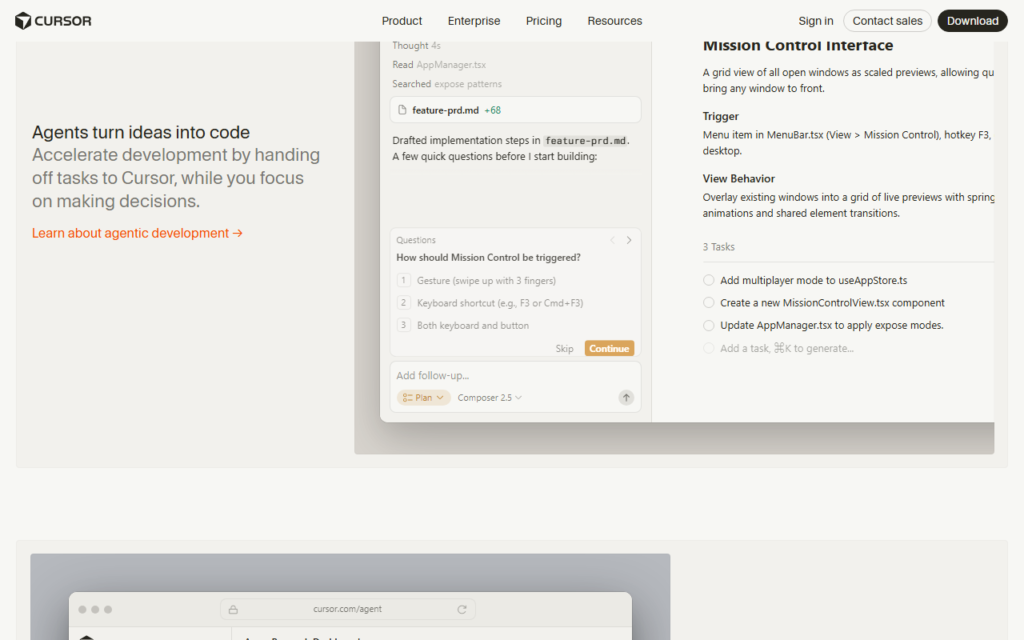
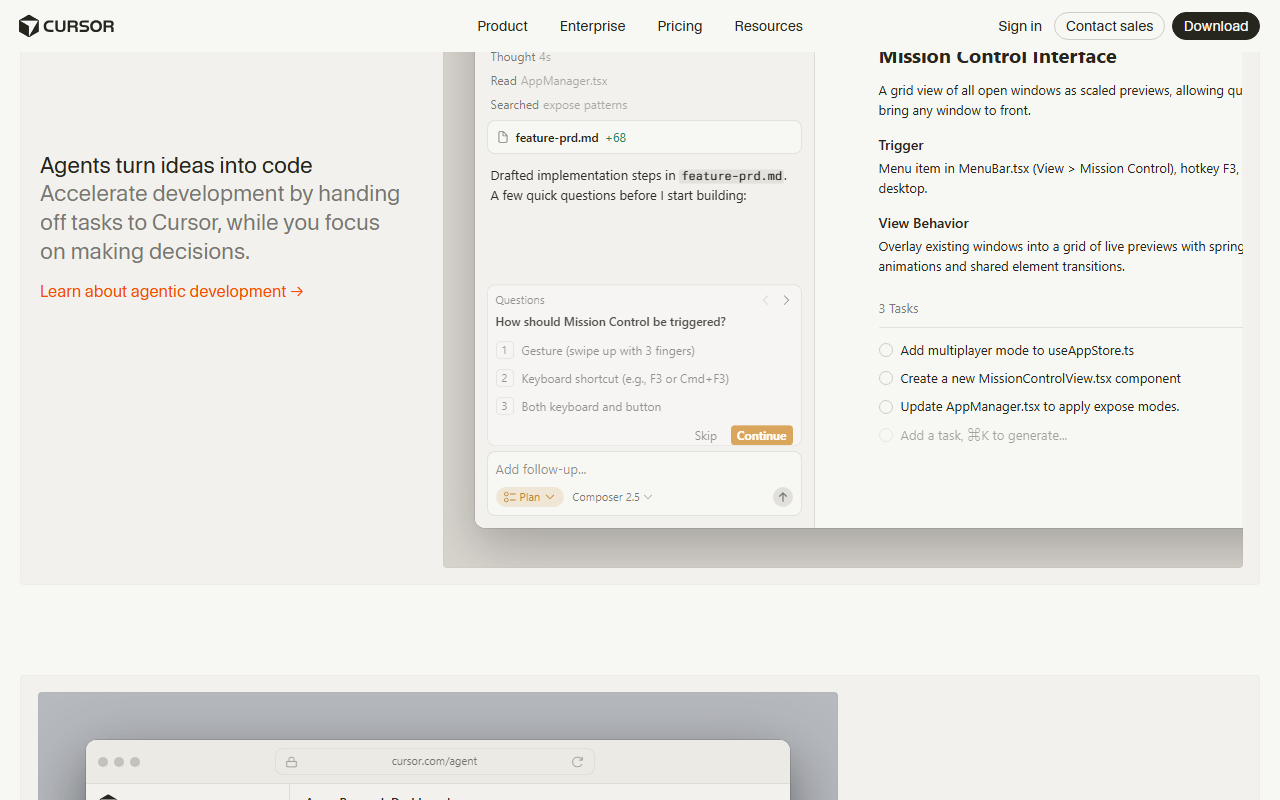
Cursor is a fork of VS Code—meaning it looks and feels almost identical to the editor you already know—but it’s been rebuilt from the ground up with AI deeply integrated into every action. Instead of a simple autocomplete, Cursor offers a multi-modal AI that can understand your entire codebase, suggest multi-line edits, refactor entire functions, and even debug errors by analyzing the context of your project. It supports models like GPT-4o, Claude 3.5 Sonnet, and its own custom models. The core idea is that you never have to leave your editor to ask a question or generate code. You can highlight a block of code and ask “What does this do?” or “Rewrite this to be more performant.” It’s like having a senior engineer sitting on your shoulder, but one who doesn’t drink your coffee or ask for a raise.
For a deeper dive into how AI code generation is evolving, check out GitHub Copilot’s official page for comparison. But Cursor goes further by being a complete editor, not just a plugin.
Cursor Interface
Hardware Recommendation: Keychron K2 Pro mechanical keyboard

My Testing Notes: The Good, The Bad, and The Ugly
What Worked (The Good)
- Context Awareness is Legit: I threw a 2,000-line Python backend at Cursor. I highlighted a convoluted function and pressed Cmd+K. I typed “Optimize this for async performance and add error handling.” It rewrote the entire function, added proper try/except blocks, and even suggested a database connection pool. I didn’t have to explain what the function did—it read the surrounding imports and variable names. That’s spooky good.
- The “Chat” Panel is Actually Useful: Unlike Copilot’s chat which often hallucinates or gives generic answers, Cursor’s chat references your open files. I asked “Where is the bug in this payment processing flow?” and it highlighted the exact line where I was missing a type check. It saved me about 40 minutes of debugging.
- Multi-File Edits: I needed to rename a database column from “username” to “email” across 15 files. I described the change in a single prompt, and Cursor proposed edits across all files. I reviewed each one, accepted, and moved on. This alone is worth the price of admission for large refactors.
What Failed (The Bad & The Ugly)
- Hallucinations on Complex Logic: I asked it to generate a custom sorting algorithm that handled nested JSON objects with specific business rules. It generated code that compiled but produced completely wrong results. The logic was plausible-looking but fundamentally flawed. If you are building safety-critical systems, you cannot trust it blindly.
- Performance Issues on Large Projects: When I opened a monorepo with over 500 files, Cursor’s indexing took almost 10 minutes, and the AI suggestions became noticeably sluggish. The autocomplete lagged by 2–3 seconds, which is jarring compared to the near-instant suggestions of Copilot.
- The “Pro” Model Quota is Real: The $20/month plan gives you 500 “fast” requests. If you are a heavy user asking 50+ questions a day, you will hit that limit within a week. After that, you get relegated to slower models (GPT-3.5 level), which feel like a significant downgrade. It’s a frustrating bait-and-switch feeling.
- No Proper Git Integration for AI: I expected to be able to ask “What changed in this commit?” but Cursor doesn’t natively read Git history. You have to manually copy diffs. For a tool that prides itself on context, this is a surprising blind spot.
For testing, I used a MacBook Pro M2 with 32GB RAM. If you are on a machine with 8GB RAM, expect even more lag.
Pricing Analysis: Is It Worth It?
Cursor offers three tiers: Free (limited to 2000 completions/month and no chat), Pro at $20/month (unlimited completions, 500 fast chat requests), and Business at $40/user/month (team controls, centralized billing). Let’s break that down.
- vs. GitHub Copilot ($10/month): Copilot is cheaper and more stable for autocomplete. But Cursor’s chat and multi-file editing are dramatically more powerful. If you are a senior developer who mostly writes code from scratch, Copilot might be enough. If you are doing heavy refactoring or learning a new codebase, Cursor wins.
- vs. JetBrains AI ($15/month): JetBrains has better IDE features for Java and Kotlin, but Cursor’s AI is more advanced. For Python or JavaScript developers, Cursor is the clear winner.
- Hidden Costs: If you exceed the 500 fast requests, you either wait or pay for more. There is no “unlimited” plan for heavy users. If you are a full-time developer using AI for 8 hours a day, you might need to budget for the Business tier or hybrid with another tool.
For hardware, I strongly recommend pairing Cursor with a Logitech MX Keys keyboard for comfortable long coding sessions, and a Dell UltraSharp 27” 4K monitor to see your AI suggestions and code side-by-side without squinting.
Pros & Cons
Pros
- Deep codebase context awareness—understands your project structure.
- AI can edit multiple files in one shot, saving hours on refactors.
- Excellent for beginners learning a new framework (e.g., Rust, Go).
- Built on VS Code, so extensions and themes work out of the box.
- Privacy mode available (code is not used for training).
Cons
- Expensive for heavy users—$20/month with request caps feels restrictive.
- AI hallucinations on complex, non-standard logic.
- Performance degrades significantly on large monorepos.
- No native Git awareness for AI queries.
- Still in active development; occasional crashes and bugs.
Final Verdict
Cursor is not a toy. It is a legitimate productivity tool that can double your output—if you use it correctly. It excels at refactoring, understanding legacy code, and generating boilerplate. But it is not a replacement for a senior developer’s judgment. You still need to review every line it writes, especially for business logic or security-critical code. The pricing is fair for the Pro plan if you are a solo developer or a small team, but the request caps are annoying. If you are on a budget, start with the free tier and upgrade only when you feel the pain of being limited. For teams, the Business plan is worth it for the centralized billing and privacy controls.
I give it a 7.5/10. It is the best AI coding assistant I have used, but it is not perfect. If you want to try it, download Cursor and test it on a real project for a week. You’ll know within hours if it clicks for you.