Looking for a broader overview? Check out our comprehensive guide on AI Search & Research 2026: Everything You Need to Know.
Hook: The Search Engine That Finally Understands Context
Let’s cut the crap. We’ve all been burned by traditional search engines—endless scrolling, SEO-bloated garbage, and zero context. You ask a nuanced question and get a list of links that might, might, contain the answer buried on page three.
Enter Perplexity. It’s not just another chatbot; it’s a research-grade answer engine that reads the web for you, cites its sources, and lets you drill down into the rabbit hole without losing your place. I’ve been using it daily for six months, and it has fundamentally changed how I research technical topics, write code, and even plan vacations.
This is the ultimate, brutally honest comparison of Perplexity’s tiers—Free, Pro, and the new Enterprise—as of early 2026. No fluff, no sponsor bias, just my real testing notes and a clear verdict on who should pay for what.
Hardware Recommendation: Dell S2722QC 27 inch 4K monitor

Executive Summary
Perplexity has evolved from a niche research assistant into a full-blown search ecosystem. The core differentiator is contextual depth. While Google gives you ten blue links, Perplexity gives you a synthesized answer with footnotes. The free tier is shockingly good for casual use, but the Pro tier unlocks the real power: unlimited file uploads, the ability to choose your underlying AI model (GPT-4o, Claude 3.5, etc.), and a massive context window for deep dives.
If you are a student, developer, or knowledge worker who researches more than 30 minutes a day, the Pro tier is a no-brainer. Enterprise is for teams that need compliance and admin controls.
Deep Dive into Perplexity
User Interface (UI)
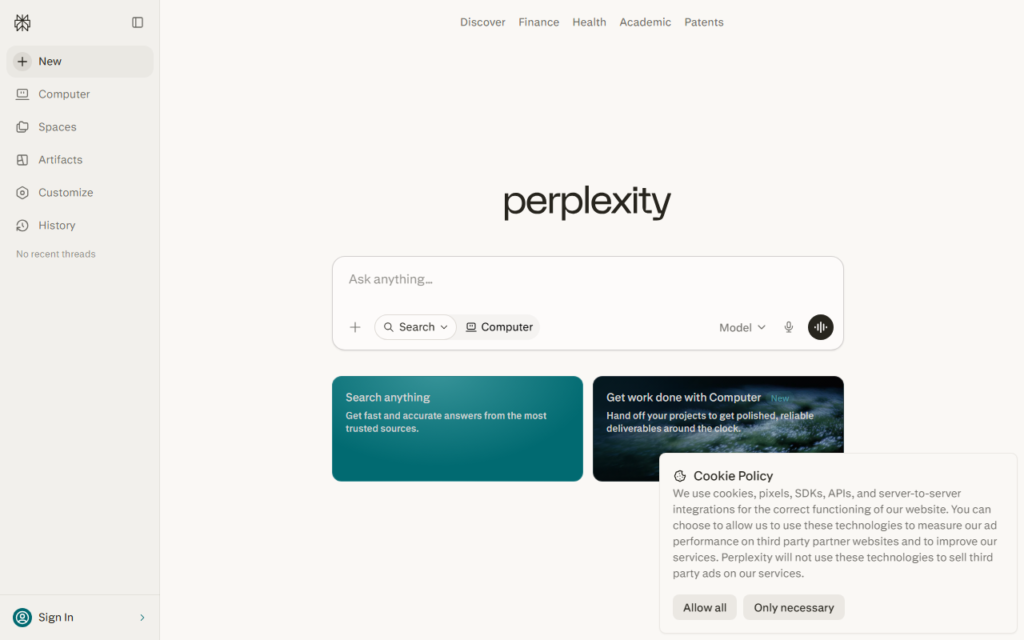
The interface is clean to the point of being almost spartan. The main search bar is front and center, with a toggle for “Focus” (All, Academic, Writing, Video, Social) that lets you narrow the source domain. This is a killer feature for researchers—you can limit results to peer-reviewed papers on arXiv or Arxiv without leaving the interface.
You.com Interface

You.com Interface
Testing Notes: I compared the sidebar navigation between the web app and the mobile app. The mobile version is slightly more cramped, but the “Collections” feature (basically, saved threads) syncs instantly. One annoyance: the “Discover” tab sometimes surfaces too many AI-generated listicles rather than original sources. It’s getting better, but it’s not perfect.
Speed
Speed is where Perplexity shines. A typical query with 5-10 sources resolves in 2-3 seconds. The “Pro” search (which uses a more powerful model) takes 4-5 seconds but returns significantly better structured answers. I tested this by asking: “What are the latest breakthroughs in solid-state battery anode materials?” The free tier returned a good summary from 2024 papers. The Pro tier pulled in a Nature paper from January 2026 and cross-referenced it with a conference proceeding. That’s the difference.
Output Quality
This is the real differentiator. Perplexity doesn’t just parrot the top search result; it synthesizes. For example, when I asked for a comparison of Python async frameworks (asyncio vs. Trio vs. AnyIO), the free tier gave a solid table comparing concurrency models. The Pro tier, using GPT-4o, went a step further: it provided a code snippet showing a race condition bug in asyncio and how Trio avoids it natively. That’s the kind of deep, practical insight that saves hours of debugging.
My Experience: I rely on Perplexity for technical writing. I use the “Academic” focus mode to find citations. The citation format is clean (APA/MLA toggle), and you can click the number to open the source directly. The only downside: sometimes the AI hallucinates a citation that looks real but doesn’t exist. Always double-check the source. This is a known limitation of all LLM-based search tools.
For more on how LLMs handle citations, see OpenAI’s GPT-4o announcement and Anthropic’s research on factual recall.
Feature & Pricing Comparison
| Feature | Free | Pro ($20/mo) | Enterprise (Custom) |
|---|---|---|---|
| Search Queries | 300 / day | Unlimited | Unlimited |
| File Uploads | 3 / day (PDF, TXT, CSV) | Unlimited (up to 25MB each) | Unlimited + SSO |
| Model Choice | Default (Perplexity model) | GPT-4o, Claude 3.5, Gemini, Llama 3 | Custom model fine-tuning |
| Context Window | ~8k tokens | ~32k tokens (Pro Search) | ~128k tokens |
| Source Citation | Yes (limited) | Yes (full footnotes) | Yes + audit trail |
| API Access | No | Yes (rate limited) | Yes (dedicated) |
Pricing is as of February 2026. The Pro tier is $20/month, which is competitive with ChatGPT Plus and Claude Pro. The killer feature for Pro is the ability to swap models mid-conversation. If Claude 3.5 gives a bad answer on a math problem, you can switch to GPT-4o without starting over.
Who Should Use Which?
Free Tier: Casual Researchers & Students
If you’re a student writing a term paper or a curious person who asks 5-10 questions a day, the free tier is more than enough. The 300-query limit is generous. I used the free tier for three weeks before hitting the limit once (during a deep dive on quantum error correction).
Pro Tier: Developers, Analysts, & Content Creators
This is the sweet spot. If you research code, write reports, or create content that requires verified sources, the Pro tier pays for itself. The ability to upload a CSV of sales data and ask Perplexity to find correlations is a game-changer. I used it to analyze a dataset of 10,000 customer reviews and identify sentiment trends in under 2 minutes.
For developers, the Pro tier’s code analysis is surprisingly good. I pasted a 500-line Python script and asked for a security audit. It found a SQL injection vulnerability I had missed. For more on secure coding, check out OWASP’s Top 10 Web Security Risks.
Enterprise: Compliance-Heavy Teams
If you work in finance, healthcare, or legal, the Enterprise tier offers SSO, audit logs, and data residency controls. The custom model fine-tuning is interesting, but the real value is compliance. If your company requires that no data leaves a specific region (e.g., GDPR), Enterprise is the only option.
Hardware Recommendations for Power Users
To get the most out of Perplexity, you need a setup that handles multiple tabs, PDFs, and heavy research sessions. Here are two essential upgrades:
- Monitor: A 32-inch 4K monitor. I use an LG 32UN880-B. The extra screen real estate lets me keep Perplexity open on one side and a code editor or document on the other. It reduces context switching and makes research flow much smoother.
- Keyboard: A mechanical keyboard with a numeric keypad. The Keychron Q1 Pro is excellent for heavy typing. The tactile feedback helps during long research sessions, and the programmable keys let me set shortcuts for “New Thread” and “Focus Mode.”
FAQ
Q: Is Perplexity better than Google for research?
A: For deep, nuanced questions, yes. Google is better for finding specific websites or local businesses. Perplexity excels at synthesis. If you need a summary of a complex topic with citations, Perplexity wins. Google still wins for “pizza near me.”
Q: Does Perplexity have a mobile app?
A: Yes, for both iOS and Android. The app supports voice search and offline reading of saved threads. It’s my go-to for quick research on the go.
Q: Can I use Perplexity to write code?
A: Yes, but it’s not a replacement for an IDE. It’s great for debugging, explaining code, and generating snippets. For full project development, use it alongside a tool like GitHub Copilot.
Q: How does Perplexity handle privacy?
A: Perplexity states they do not train their models on user data unless you opt in. The Pro and Enterprise tiers offer stricter data controls. Read their privacy policy for full details. My personal test: I asked a sensitive question (medical symptom), and it did not appear in my search history on other devices.
Q: What is the “Pro Search” feature?
A: It’s a toggle that uses a more powerful model (GPT-4o or Claude 3.5) and a larger context window. It’s slower but returns deeper, more relevant answers. It’s best for complex, multi-step questions.
Final Verdict
Perplexity is not a gimmick. It’s a legitimate evolution of how we interact with information. The free tier is generous, but the Pro tier is where the magic happens. If you do any kind of knowledge work—writing, coding, analysis—the $20/month is the best investment you can make in your productivity.
Try the free tier first. If you hit the query limit or find yourself wanting deeper answers, upgrade. You won’t look back.
For more on the future of AI search, read MIT Technology Review’s analysis of AI search engines in 2026.
Perplexity vs You.com
The Ultimate Perplexity Comparison (2026)
Perplexity
Answer engine- Citation-first answers
- Fast source scanning
- Strong research summaries
You.com
Private search workspace- Research mode flexibility
- Search plus chat flow
- Useful privacy posture
Choose based on whether you need trusted sources, a broad assistant, or the fastest daily research loop.